
Project Preview
Redesigned and rebuilt a learning academy experience to create a more structured, accessible, and scalable training environment that helped users find the right information faster and build confidence with the platform.
- Role: Director of Training/Senior Manager, Product Training
- Organization: AutoAlert
- Time frame: 2015 – 2018
- Project type: Customer-facing project
- Primary focus: Learning experience design, product education, knowledge management, user adoption, and creating scalable training resources.
- Tools used: Learning Management System (LMS), video creation tools, PowerPoint, Vimeo, Confluence, WalkMe
Where This Was Used
This training program was used at AutoAlert, an automotive software company whose primary users are dealership employees, with a focus on sales and data mining.
What I Created
To accomplish completely redesigning the training program to significantly expand it, I worked closely with my manager, a VP who guided the vision and direction of the program while I focused on creating the materials and documentation, while also training employees and our customers, both virtually, at the office, and on-site at various locations across the U.S.
- Redesigned learning academy structure
- Role-based learning paths
- New user onboarding resources
- Bite-sized instructional videos
- Product training documentation
- Quick reference guides
- Knowledge base resources
- Process documentation
- Updated training materials aligned with product changes
- Self-service resources to support ongoing learning
- WalkMe guidance to provide in-product support
Why I Created It
When AutoAlert and MotoFuze merged, a huge opportunity was presented – to combine the innovation and energy of a startup team with the longstanding quality of an established product that dealerships valued. The goal was to increase user adoption, so training was a huge part of that.
Prior to the merge, the software was typically only used by a few employees at the dealership. The goal was to get most of the dealership employees using it. This was no longer just a sales tool, this was a multi-faceted software tool that could benefit many roles, and the training needed to support that.
When we evaluated the existing training program in comparison to our lofty goals, we knew a complete redesign was necessary to support the new roles we’d be introducing and provide more microlearning opportunities to better suit the busy schedules of dealership employees.
The training didn’t end at the dealership – our employees also needed to have a thorough knowledge of the tool to effectively develop, sell, implement, train, coach, and support it.
Who I Created It For
The training I created was designed to support everyone involved with the software:
- Product & development needed to understand the history of the software, how it was built, and how it was used by the end users so they could more effectively plan its future state.
- Sales needed to understand basic functionality and the value propositions of the software to effectively sell the tool to dealerships.
- Implementation needed to understand the setup of the software and have a clear path leading new accounts through implementation into training.
- Training needed to have a thorough understanding of the tool to answer questions about it, share best practices, know how different dealership roles could most effectively use the software, role-play, provide live webinars, and explain updates.
- Performance managers needed to understand how the software was meant to be used with customers so they could effectively coach their accounts and improve their success with the tools.
- Support needed to understand software functionality and troubleshooting to know whether a customer could be walked through steps to resolve or whether an issue needed to be escalated to ensure customers had a fully functional tool.
How I Created It
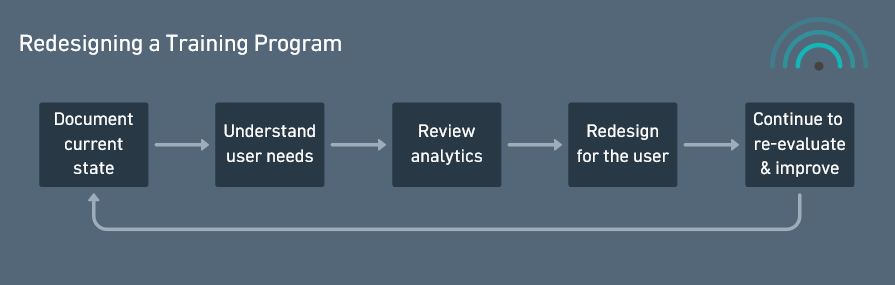
The redesign was a multi-year project that started with my VP guiding the vision while I created the materials and built the structure. Over time, the team expanded to meet the needs of our growing customer base, providing a well-structured learning experience.
Observe
I looked at how users interacted with the product, training materials, and support resources to identify where confusion or friction existed, as well as analytics to understand how many people watched the existing videos and for how long.
Understand the Goal
The goal was to help users become successful faster by providing clear guidance at the right moment, rather than overwhelming them with information. We also wanted to increase user adoption by expanding usage to a variety of roles at the dealership, so we’d need to clearly define how the tool could be used effectively for each role.
Remove the Friction
I reorganized content, simplified complex concepts, and created new resources that allowed users to quickly find answers without needing additional assistance. Content was also available by role so users didn’t have to search for content that was relevant to them – relevant materials would be presented based on their role.
Since it’s often helpful to have in-person trainings, we also increased our on-site training sessions and developed new on-site training materials so customers had consistent training with proven effectiveness.
Design for People
I focused on the real needs of learners: different roles, different experience levels, and different ways of absorbing information.
In analyzing video analytics, we identified that viewers stopped watching around 5-7 minutes, so we focused on microlearning – creating short videos that covered specific topics so users could quickly learn what they needed to know.
When reviewing training manuals, we saw that the focus was on promoting the live webinars, with minimal information guiding users on how to use the tools, so we created more detailed manuals and 1-page quick reference sheets that could be bookmarked or printed and posted at a user’s desk.
As we expanded our user base to include users outside of sales, we developed role-based training that focused on key topics users needed to know to succeed with the tool based on their role.
The certification program also was revised to include a larger variety of randomized questions and we expanded it to include certifications on our growing collection of products.
Evaluate Results
I used learner feedback, training interactions, and recurring questions to understand what was working and where additional support was needed. Reviewing training video analytics weekly was one of the ways we evaluated the effectiveness of our training, as well as tracking certifications.
Refine & Improve
I continuously updated materials as the product evolved, incorporating feedback and improving resources to better support users.
What It Accomplished
- Created a more structured and scalable learning experience that made training resources easier for users to navigate and consume
- Improved onboarding consistency by establishing clearer learning paths, reusable training materials, and standardized resources
- Reduced reliance on one-off training requests by expanding self-service learning options and creating resources users could access on demand
- Preserved product knowledge by documenting workflows, processes, and best practices in a centralized learning environment
- Improved accessibility of training by supporting multiple learning styles through videos, documentation, job aids, and in-product guidance
- Increased alignment between training content and real user workflows, helping users better understand how to apply the product in their day-to-day roles
- Created a foundation that could scale as the product evolved, reducing duplicate work and making future training updates more efficient
Continued Impact
Although I left AutoAlert in November 2020 and was not part of the team that received the award, the training team went on to earn a Silver Stevie Award for Customer Service in early 2021.
The award recognized AutoAlert’s virtual onboarding and training support program, which included a 60-to-90-day onboarding process, an interactive digital playbook, role-based training, and an expanded library of on-demand content. Several of those capabilities reflected the direction I had helped establish through the Learning Academy, role-based learning paths, digital training resources, certification programs, and the development of trainers who continued supporting the organization after my departure.
I view the award as meaningful evidence of the training team’s continued growth and the strength of the foundation we built together. The team members who carried that work forward deserve full credit for adapting it during the pandemic and earning the recognition.
Article: AutoAlert’s Training Team Wins 2021 Stevie Award for Customer Service
Explore the Project
Due to the proprietary nature of this work, examples from the learning academy cannot be publicly shared.
Examples of work created for this project include:
- Learning academy structure and information architecture
- Role-based learning paths and curriculum planning
- Product training videos and demonstrations
- User onboarding materials
- Technical documentation and process guides
- Quick reference guides and job aids
- Knowledge base articles
- LMS organization and content strategy
- In-product guidance and WalkMe experiences
The focus of this work was creating scalable learning resources that improved user understanding, reduced friction, and supported successful product adoption.

