
Project Preview
Designed and maintained a self-service software learning platform consisting of instructional videos, supporting documentation, downloadable resources, and searchable written content to help users learn Microsoft Office tools independently.
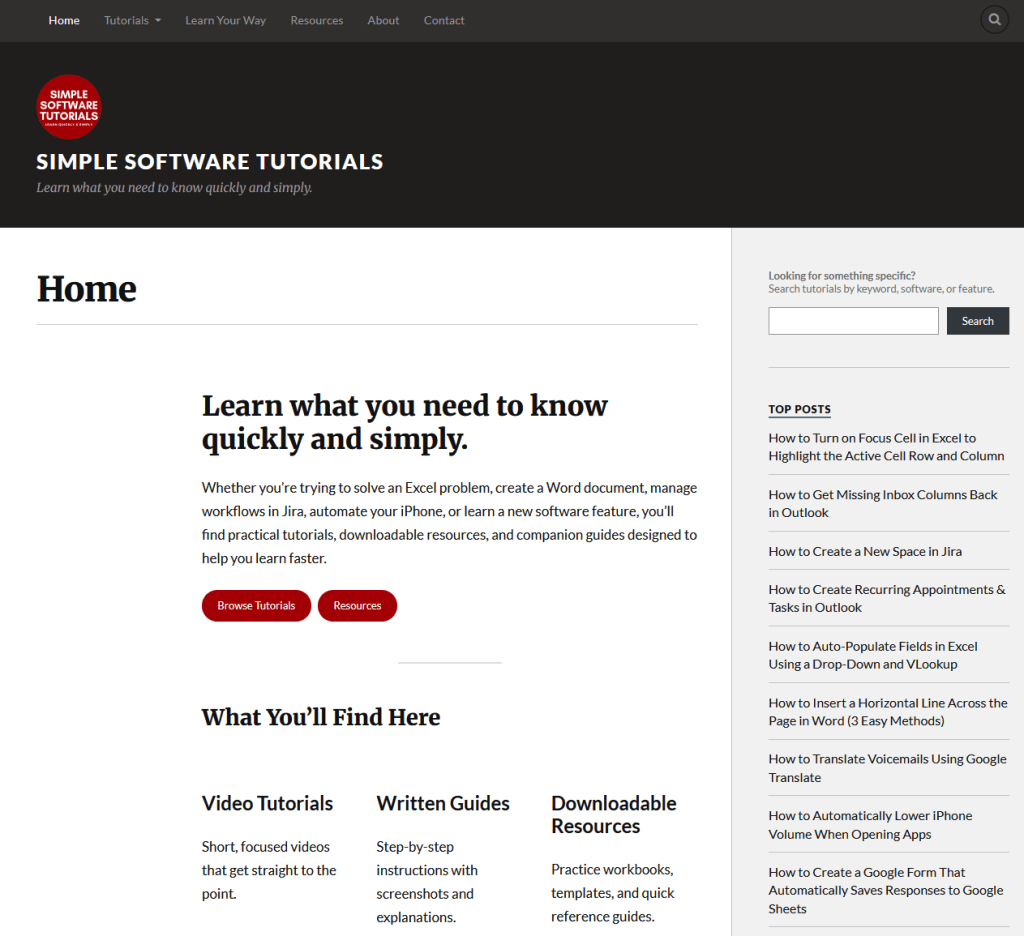
- Role: Founder, Content Creator, Instructional Designer, Technical Writer, Video Producer, Website Manager
- Organization: Simple Software Tutorials
- Timeframe: 2013 – present
- Project type: Independent project
- Primary focus: Creating accessible, practical software training content that helps users solve real-world productivity challenges using various software tools.
- Tools used: Microsoft Office Suite (Excel, Word, PowerPoint, Outlook), YouTube Studio, Website/blog platform, Screen recording and video editing tools, SEO and analytics tools, Adobe Creative Suite, Jira
Where This Was Used
Simple Software Tutorials is a free resource available to users on the web and on YouTube. I’ve continued to create content for both my website and YouTube channel since 2013, and significantly increased content and resources on my website starting in 2026.
What I Created
Simple Software Tutorials started as a YouTube channel in 2013 and existing on various blog sites until officially claiming SimpleSoftwareTutorials.com in 2018.
Over the years, my YouTube channel has grown to more than 6,680 subscribers, 250+ videos, 113,000 hours of watch time, and more than 2.5 million views. My website has more than 100 tutorials and complete guides, serving as a supplemental resource to my YouTube channel. In 2026, I’ve been expanding my website to include more thorough step-by-step guides as a companion to my tutorial videos, as well as providing a wealth of resources, such as quick reference guides, practice Excel workbooks, and a Google Drive of resources to support the content I create.
Why I Created It
I decided to create Simple Software Tutorials in 2013 because I was tired of looking up how to do things on YouTube and having to listen to someone ramble on about irrelevant information before finally getting to the point. I decided I would create my own tutorial videos where I simply focused on the goal, I explained the concepts in simple terms anyone would understand, and I provided it as quickly as I could, typically in less than five to seven minutes.
I’d consider challenges I’d faced or questions my coworkers had asked me about how to do this or that in Outlook or Excel and I took those real-life scenarios and created simple videos to guide viewers through common challenges they’d encounter.
Who I Created It For
I designed Simple Software Tutorials for novice to intermediate users. The goal was to present information in a way that anyone could understand and from a logical starting point. I used language that was easy to understand, I demonstrated step-by-step instructions showing users where to click or access information, and I explained complex concepts and terminology in a way that was easy to understand.
The goal was not to try to prove that I was smarter than anyone; the goal was to help people understand how to accomplish things using common tools available to them.
How I Created It
Observe
I noticed that a lot of tutorials at the time went off track and wasted time on irrelevant details, which was a frustrating experience for a user. Typically, when I had to look up how to do something, it was because I needed to know that information quickly to accomplish what I needed to do. I didn’t care about what the creator did in their last video, I just wanted to know how to do this one simple thing and I didn’t want it to take 15 minutes.
Understand the Goal
My goal was always “learn what you need to know quickly and easily.” There’s no reason for tutorials to be complicated because the whole reason for a tutorial is to help someone accomplish something.
Remove the Friction
I removed the friction in multiple ways:
- I use simple terminology that is easy for people of all skill levels to understand.
- I keep my tutorials short and concise so viewers quickly understand how to do what they want to do.
- I start from the beginning, showing users each step of the way, starting from a fresh document so it’s easy for them to follow along.
- I expanded my website to include more thorough documentation, step-by-step instructions, and additional resources so users could learn in a way that best suited them and they’d have resources they needed to be successful.
- I created a learning ecosystem where everything was connected in a logical manner:
- My website has the tutorial videos embedded for easy viewing
- My YouTube videos include helpful information and links to my step-by-step instructions and resources
- I’ve created guides that string together multiple tutorials in a logical way so it’s easy to follow
Design for People
I’ve trained people for decades and understand how people learn in many different ways, so I aim to provide a variety of resources that suit my audience. While videos are helpful to watch, it can also be helpful to have written step-by-step instructions for those who don’t care to or who aren’t able to watch a tutorial video. It’s also often helpful to include a sample document so users have a starting point or so they can copy formulas. I also highly value cheat sheets and quick reference guides that can be posted at my desk for reference, so I like to include those whenever it might be helpful.
Evaluate Results
Since the start of Simple Software Tutorials, I’ve continually evaluated how my content is received and what is the most popular. I also frequently research what content people are searching for and often use examples from my life and career.
I know that my video explaining How to Create Mailing Labels in Word From an Excel List is going to be one of my top viewed videos every Fall as people prepare to mail out holiday cards, and based on YouTube analytics.
I also know that some of my videos are some of the only videos that cover a specific combination of Excel formulas or that explain a concept in a way that’s easy for users to understand, based on the comments.
I pay attention to my content that gets the most attention so I can make it even more valuable, and I expand on content where there seems to be a need for it.
Refine & Improve
Reading comments on content is not always the most pleasant experience, but I have gained so much insight into my viewers from content and they’ve been an excellent source of ideas for content as well.
One of the biggest things comments have taught me is that it is necessary to really explain each step, even if it seems super obvious. Something that sticks out in my mind is from one of my videos where there were several comments asking how I made an underscore. At the time, it was something I thought was obvious, but I’m so grateful my viewers asked me about it so I could explain it to them. Moving forward, I try to always explain everything I do to ensure all of my viewers, regardless of their skill level understand every step of my instruction.
What It Accomplished
Ultimately this project has helped me feel like I am helping people learn how to do things to make their lives and jobs easier. I love helping people and this is a way I can help people all around the world.
Additionally, my work in creating content for the site has earned me multiple employment opportunities because it demonstrates my ability to create learning content that is easy to follow and understand.
But ultimately, it has helped thousands, if not millions, of people accomplish what they wanted to do quickly and simply.
Explore the Project
Below are links to my Simple Software Tutorials website and YouTube channel to explore the content I’ve produced for each.

