
Project Preview
An independent UX and product design project exploring how a thoughtfully designed mobile application could simplify home inventory management while supporting homeowners, renters, and property managers.
- Role: UX Designer, Product Designer & Researcher
- Organization: Independent UX & Product Design Project
- Time frame: 2020
- Project type: Independent project
- Primary focus: Mobile application design, UX research, product strategy, information architecture
- Tools used: Adobe XD, competitive research
Where This Was Used
This was an independent project to practice and demonstrate my UX research and design abilities.
What I Created
I designed a home inventory mobile app concept that features:
- A simple login screen with password reset and account creation functionality
- A setup checklist to assist users in using the app effectively
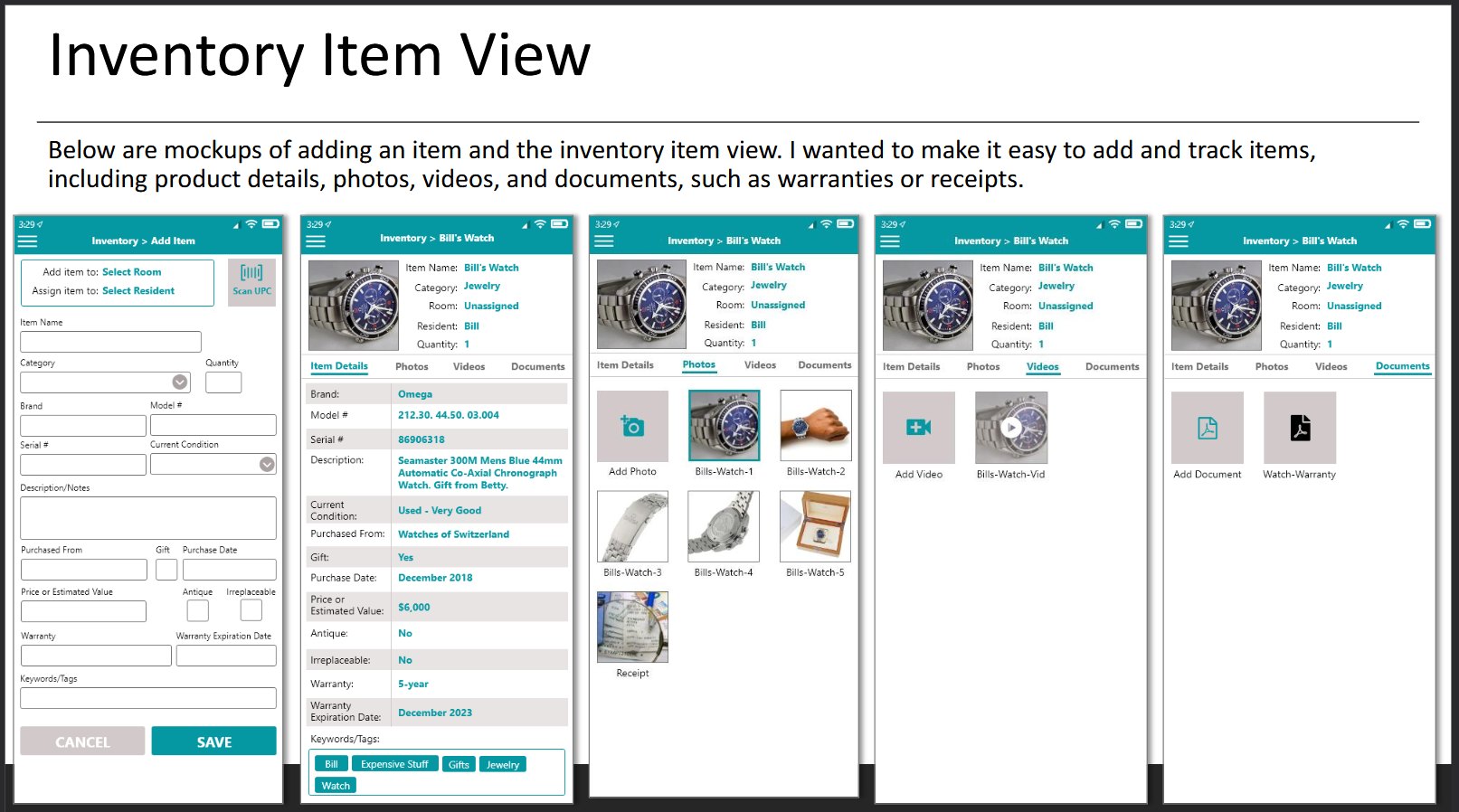
- Home inventory management system with the ability to add photos, videos, and documents, like receipts
- Property management system so users can manage multiple properties
- Resident management to store contact and emergency contact information for residents
- Room management to document home inventory by room
- Pet management to keep track of pets at the residence, including pet age, photo, medication, and veterinarian contact information
- Vehicle management for easy access to vehicle information, including licensing information
- Profile management
Why I Created It
People often don’t think about what they have in their home until disaster strikes. The last thing they’re going to want to do is try to track down photos, receipts, or other documentation to provide to their insurance company or for a police report to document any losses – they need to be able to focus on their next steps needed to recover from what happened.
I designed this concept as a solution for people affected by any circumstance that could affect their home or property, such as natural disasters, like tornadoes or floods, that damage homes, fires, burglaries, or even having irresponsible renters on a property.
This app would allow users to easily document their possessions, provide a location to store records of their possessions, including photos, videos, and receipts to make filing insurance claims or police reports easier.
Who I Created It For
I designed this app concept to be relevant to most adults, regardless of their home ownership status. This include offering a graduated subscription model including:
- A free limited version geared toward renters or single-home owners
- A premium version with enhanced features for multi-property owners or those who want to more thoroughly document inventory and home renovations
- A commercial version for small to midsize property management companies to document several properties and residents
My goal was to make the app simple enough to use that anyone of any skill level could benefit from it. I designed it to be effective regardless of whether the user wanted to input a minimal amount of information, but also offer the ability to include detailed information, especially for higher value possessions.
How I Created It
Observe
When I moved from the West Coast to the Midwest, I was faced with the fact that my home could be destroyed in seconds by a tornado. Although I try to stay organized and prepared for whatever might happen, I realized that if my home was damaged in a tornado, it would probably be challenging for me to determine the value of my possessions or come close to documenting my loss.
I started this project by studying existing home inventory applications, customer reviews, and industry articles to understand where users struggled and which features they valued most.
Understand the Goal
The goal wasn’t simply to create another inventory app. It was to design a solution that people could continue using as their homes, belongings, and responsibilities changed over time.
Remove the Friction
I simplified navigation, organized information into logical categories, introduced guided setup, and provided contextual help so users wouldn’t feel overwhelmed by the amount of information they could manage.
Design for People
Every design decision centered on making a feature-rich application feel approachable. I wanted new users to get started quickly while still providing advanced functionality for users with more complex needs.
Evaluate Results
Although the application wasn’t released, I evaluated design decisions by asking whether each feature added meaningful value or unnecessary complexity. User reviews of competing products served as valuable validation throughout the design process.
Refine & Improve
The project evolved continuously as research uncovered additional opportunities. Rather than designing isolated screens, I refined the overall experience to create a cohesive product that could grow with its users.
What It Accomplished
Although this was an independent project intended to represent my UX research and design experience, it is a realistic example of the type of work I did and the thought process I followed to create a mobile app concept.
It demonstrates my ability to:
- Analyze a user experience
- Find opportunities to expand upon and improve from existing products
- Understand mobile app design
- Perform competitive analysis and UX research
- Use Adobe XD to design a mobile application concept
- Create a streamlined mobile experience
- Design for non-technical users
Explore the Project
Below you can view the project overview with screenshots and explanations I created for this project.
View the embedded file below or click the “view PDF” button to open it in a new browser tab.

